
Diese Anleitung auf Deutsch: zur deutschen Fassung.
A working guide to the 3D floor graphic tool — for marketing agencies, printing companies, and anyone selling floor space.
Contents
- What it actually does
- The part that matters
- And your photograph is deleted
- Four ways to use it
- If you are a marketing agency
- If you are a printing company
- If you are a business owner or entrepreneur
- Getting a mockup that actually convinces
- What happens after the mockup
- Questions people actually ask
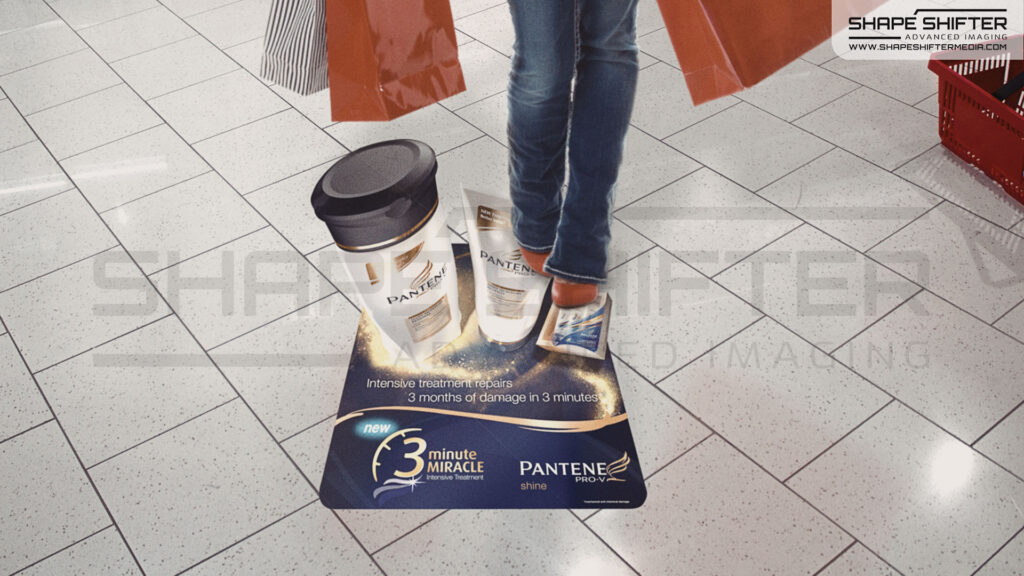
A 3D floor graphic works best from one defined point of view — as somebody walks up to it, or from a fixed position such as a TV camera. That viewpoint is what the artwork is calculated for, and from there the floor opens up.
Which makes one thing worth getting right: the mockup. Building a visual that shows what genuinely works in that room, at that viewpoint, is real graphics work, and it has always taken days. That is the part this tool removes.
It also removes a trap. The usual shortcut is Photoshop, and it is the wrong technique for this. A montage pastes artwork onto a photograph instead of calculating it for the floor, so it happily shows designs that cannot exist in reality — a graphic at an angle no viewer will ever stand at, or an effect the perspective will not support. Designers working without the production geometry produce mockups that look convincing and then do not survive contact with the actual floor. By that point the client has approved them, and the correction lands in production.
The tool at shapeshiftermedia.com/floorgraphics-live-tool solves all of that at once. You place the design live on the floor you are standing on, using the phone in your pocket or the iPad in your bag, and the mockup comes back built on the same calculation we use to produce the printed graphic. What you show is what can actually be printed and laid.
Three things follow, and they are what the rest of this guide is about.
It is immediate. About a minute, on the spot, instead of a request that has to be scheduled into someone’s design week.
It is interactive. You are not presenting a finished picture. You move the design across the floor, try it at the entrance and then by the shelf, and let the person you are talking to point at where they want it. That is a far better conversation than a proposal.
It makes the concept land fast. This is the real prize. Clients, managers and partners understand a 3D floor graphic within seconds of seeing one on their own floor, from the spot where their customers walk in. What used to need a long explanation now needs none.
What it actually does
Three steps, and the whole thing takes about a minute.
- Choose a layout. Browse the collection — Halloween, Seasonal, Retail, Crowd Control — and pick one.
- Place it on the floor. Point your phone or iPad camera down at the floor in front of you. The design appears on it, live, and you move it into position.
- Get the mockup. It is rendered into your photograph and sent to you by email.
The designs in the tool are built at the standard format: 64 cm wide (left to right) by 96 cm long, in the walking direction. That is the size the collection is calculated for, and it is the size you should assume when you talk about it — anything else is a recalculation, not a resize (see the one production rule).
The collection is not static, either. New designs are added regularly, and seasonal sets land ahead of each season — Halloween, Christmas, Valentine’s — so it is worth looking again before a campaign rather than working from what you saw last time.
It is free. There is no login, nothing to install, and it runs in the browser on a phone or an iPad. You give an email address at the end, because that is how the mockup reaches you.
Reach for the iPad whenever somebody else is watching. Held upright, the larger screen shows the graphic at a size a phone cannot match, and the effect is considerably more convincing across a desk or in a room. Phone for checking something yourself, tablet for showing it to anyone else.
The part that matters
Your photograph is not having a picture pasted onto it. The design is rendered into it using the same geometry we use to produce the printed graphic — the same perspective construction, the same camera model, solved against the floor plane in your photo.
That is the difference between this and a mockup somebody knocked together in Photoshop, and it is a difference you can check. A Photoshop mockup is a guess about how the artwork will sit. This is the production maths, run early.
And your photograph is deleted
As soon as the mockup is built, the photo you supplied is deleted from the server — it is never publicly accessible at any point, and the delivered file has all its EXIF and GPS data stripped out.
This matters more than it sounds. You are about to photograph the inside of somebody else’s supermarket, hospital, or head office, sometimes without asking first. Being able to say the photo is deleted the moment the mockup is made is the difference between a quick yes and a conversation with somebody’s facilities team.
Four ways to use it
Everything below is built from these four. They land differently depending on what you do for a living, which is what the three sections after this are for.
1. The open collection
shapeshiftermedia.com/floorgraphics-live-tool is public. No login, no account, nothing to arrange with us first. Every design in the public collection is there to be put on any floor you happen to be standing on, at the standard 64 × 96 cm format.
It is also kept current: designs are added regularly and each season’s set goes up before the season, so there is usually something new to show a client you spoke to a month ago.
Which means you can show it to anybody, anywhere, on the phone in your pocket or the iPad in your bag — a colleague, your boss, a client, a partner, a supplier, somebody you met ten minutes ago at a stand. There is nothing to prepare and nothing to book.
2. A private link with only your designs on it
Ask us, and you get a link that carries your artwork and nothing else.
It looks like the ordinary tool URL with a token on the end. It is not indexed by search engines, it cannot be guessed, and it shows your layouts instead of the public collection. Someone you send it to sees a small, clean set of work that was made for them — not a catalogue they have to hunt through.
You can send that link to anyone. It carries no password, so there is nothing to explain and nothing for them to forget.
3. A separate link for each of your clients or projects
This is the one that changes how agencies and resellers work.
Underneath your own link, we can create a link per client or per project. Each one shows nothing but that client’s work. Your customer opens their link and sees their own campaign on their own floor — and no trace that any of your other customers exist.
Meanwhile your own link still sees everything: your work and every project underneath it. One link to review the lot; a separate link for each customer to be sent.
If a link ever needs to stop working, it does — and permanently. Revoking a link and deleting the artwork behind it are the same action, so a withdrawn link is not just hidden, it is gone. Links can also be given an expiry date, though by default they simply stay open.
4. Your watermark instead of ours
Mockups carry a small Shapeshifter Media mark. On request we can replace it with yours, so what you hand a client is branded as your work.
Everything else stays the same. It is the mockup that changes, not the design.
If you are a marketing agency
The job: win the room before anyone asks about the quote.
Floor graphics land hardest when the client sees one in their own space. Until now that meant commissioning a visual for their room days before the meeting — worth doing for a pitch you have already won, rarely worth it for a first conversation.
The tool removes that constraint: you can now show a client their own floor in the first meeting, at no notice, and let them move the design around while you talk.

In a pitch, on the client’s own floor
Take the meeting at their premises when you can. Before you present, or in the middle of presenting, stand in the space, photograph the floor, and put a design on it. They are looking at their own reception, their own shop floor, their own foyer.
There is a difference in kind between here is a floor graphic in a supermarket somewhere and here is one in yours, taken four minutes ago, from where your customers walk in. The first is a reference. The second is a proposal.
Bring an iPad for this. Held upright it gives you a far bigger canvas than a phone, so the whole table can see the floor open up at once rather than taking turns with a handset — and you can hand it over and let the client move the design themselves.
If you are pitching in your own office or over a call, the same trick works on a photograph they sent you, or on any floor you can get to. Weaker, but still miles ahead of a flat PDF.
Getting past the approval chain
Most agency work dies in a chain: your contact loves it, then has to sell it upward to somebody who was not in the room, using your deck, badly. That second-hand pitch is where good floor-graphic ideas evaporate.
Give your contact something that survives forwarding. The mockup arrives by email as a single image, ready to be forwarded on, and it makes the case without needing you standing next to it. It is a 4:5 portrait JPEG, which is a deliberate shape — it fills a phone screen, which is where it will actually be looked at.
One caution: the link in that email stops working after 30 days. The image file itself is yours forever, so download it and put it in the job folder. Do not rely on forwarding a two-month-old email and expecting the link to still open.
Per-client links, and why they matter to an agency specifically
Ask us for a link per account. Then:
- Each client gets a link showing only their own work. Nobody ever glimpses another client’s unreleased campaign, which is not a nicety — it is a confidentiality problem waiting to happen, and this removes it structurally rather than by being careful.
- You keep one link across the top that sees everything, so reviewing the whole book is one URL.
- When a pitch is lost or a relationship ends, the link is revoked and the artwork goes with it.
Add your own watermark on top of that and what your client receives is your work, in your name, on their floor.
Practical notes
- Send the client link with a sentence about what it is. It is unbranded and carries no password, so with no context it reads like a stray URL.
- Anything you make on a client link behaves exactly like the public tool downstream — the mockup still arrives by email, so a client can make their own and forward it to you.
- Custom design work is the real conversation. The collection exists to demonstrate the format; a campaign usually needs the client’s own product, character or promotion on the floor. That is made to order, and it is what most agency projects turn into.
If you are a printing company
The job: sell a format your existing customers do not know they can buy.
Your position here is unusual, and it is worth being clear about it: this is not a product you resell. The print-ready graphics can be used with any printing company or substrate. You print them. On the wide-format kit you already own, on substrates you already stock.
What you are missing is not capacity. It is the thing that makes somebody say yes.

The counter conversation
A customer is standing in front of you ordering banners, window graphics or POS. They are a retailer, a gym, a garden centre, a car dealer. They have a floor. Nobody has ever offered them anything to put on it.
A sample book cannot do this justice, because the effect depends on standing in the right spot. Your phone or iPad can: photograph the floor of their shop if you have been there, or your own showroom floor if you have not, and show them the format working in about a minute — while they watch, moving it to the spot they care about.
That is a genuine upsell on a job already in progress, and it costs you the length of the conversation.
On a site survey
If you already visit to measure and quote — a shop refit, an exhibition stand, a supermarket rebrand — you are standing on the floor with a phone or iPad in your hand and a customer beside you. Photograph the floor while you are there. You will leave with an extra line on the quote that nobody asked you for.
What you are actually quoting
The design and the data preparation are separate from print and installation, and that split is worth making explicit when you quote, because it is what makes the numbers legible to a customer.
The standard format from the collection is 64 cm wide by 96 cm long, which is the number to quote against unless the job is a custom design at another size.
For the print itself, the combinations that have proven reliable are:
| Substrate | Use | |
|---|---|---|
| 4C Indoor | Self-adhesive vinyl, 4-colour print, anti-skid laminate | Mid-term indoor |
| 5C Indoor | Self-adhesive vinyl, 5-colour transparent silkscreen, anti-skid laminate | Mid-term indoor |
| 4C Outdoor | Self-adhesive vinyl, 4-colour print, anti-skid laminate | Short-term outdoor, mid-term indoor |
| 4C Carpet | Fine velours carpet, anti-skid latex rubber back | Movable and re-usable |
| 4C Vinyl | High-quality vinyl, anti-skid latex rubber back | Movable and re-usable |
All the self-adhesive options install easily and remove without residue. The carpet and heavy-vinyl options are the ones to reach for when the customer wants to move the graphic between locations or reuse it next season — that reusability is often what closes an event or exhibition job.
They go on any smooth, clean, dry floor: tile, wood, concrete. No electricity, no pre-existing installation, nothing to mount.
The one production rule you must not break
A 3D FloorGraphic is calculated for a specific final print size and must never be scaled. Not up, not down, not “just a bit to fit the roll”. For the standard collection that size is 64 cm wide by 96 cm long — print it at exactly that.
The whole effect is a perspective construction solved for a viewer at a particular height and distance. Scaling the file breaks that construction, and what you print will be subtly, unfixably wrong — it will read as a distorted sticker rather than a hole in the floor, and the customer will not be able to tell you why they dislike it.
If the size needs to change, the design is recalculated at the new size. Multiple sizes and versions can be produced from the same original design at reduced cost, so this is a phone call, not a problem.
Working it into how you already sell
- Put a floor graphic on your own showroom or reception floor and photograph the real thing. Then you are demonstrating a product you have made, not a mockup.
- Ask us for a private link holding the designs relevant to your customers, so you are not scrolling past Halloween pumpkins while quoting a hospital.
- If you serve trade customers of your own, a link per customer keeps each of their campaigns separate.
- Add your own watermark, and the mockups your customers receive carry your name.
If you are a business owner or entrepreneur
The job: two conversations, and the tool is how you win both.
This section covers two different readers. The second is the more interesting one.
If it is your own floor
You run the shop, the gym, the restaurant, the clinic. You have floor space doing nothing, and no design budget and no agency.
You are the easiest case in this guide: stand in your own space, photograph your own floor, and see whether it works there before you spend anything at all. Try it where people queue, where they stop, where they turn a corner and decide which way to go.
Nobody has to approve it and nothing has to be commissioned to find out.

If you are selling floor space as advertising
This is the one worth reading properly.
Floors in supermarkets, shopping centres, stations, cinemas, venues, car parks, trade fairs and public buildings are, almost universally, unsold advertising inventory. People look at the floor. Brands would pay to be there. In most buildings nobody has ever offered it, because showing a building manager what it would look like used to mean commissioning a visual first. Now it takes a minute, standing on the floor in question.
That is a business, and it has been Shapeshifter Media’s own line of work since 2004 — developing methods to monetise unused space. Starting one means winning two separate arguments, in this order.
Argument one: the space owner
You need the facility manager, centre management, venue operator or authority to agree that a graphic belongs on their floor at all. Their instinct is no. Their concerns are real ones: damage, slipping, cleaning, how it looks, how it comes up again.
Go and stand in the building with them and show them, on the actual floor, at the actual spot you want. This is the single strongest thing the tool does, and it is worth planning the meeting around it — walk the floor together, put a design down where you want to sell, and let them look at it.
What you are answering, in order:
- “What would it even look like?” — They are looking at it. In their building.
- “Will it wreck my floor?” — The self-adhesive options install easily and remove without residue.
- “Is it a slip hazard?” — The graphics are covered with an anti-skid laminate.
- “Does it need power or fixings?” — No electricity, nothing mounted, nothing structural.
- “What if we hate it?” — The carpet and heavy-vinyl versions are movable and re-usable; they are laid, not installed.
Photograph several positions while you are there. A conversation about which of these three spots is far better than a conversation about whether.

Argument two: the advertiser
Now you are selling that space to a brand. You have something a media pack cannot buy: you can show them their campaign, on the actual floor, at the actual site, before they commit a cent.
Take the mockups you made during argument one and use them as your inventory shots. For a serious prospect, get their own design made — custom work is made to order — and put that on the floor instead of a stock one.
A media owner who can email a picture of the client’s own product on the client’s own chosen floor is doing something the poster site down the road cannot do.
Going on site
- Photograph in the light the graphic will live in. A supermarket aisle at midday and the same aisle under night lighting are different sells.
- Get the whole approach in shot, not just the floor — a graphic seen from twenty paces away is what makes people walk toward it.
- Ask before photographing somebody’s premises. The fact that the photo is deleted as soon as the mockup is built is a genuinely useful thing to be able to say.
Getting a mockup that actually convinces
The tool is honest about its own limits, and knowing them is the difference between a mockup that lands and one that quietly undermines you.
Hold the device the way it asks
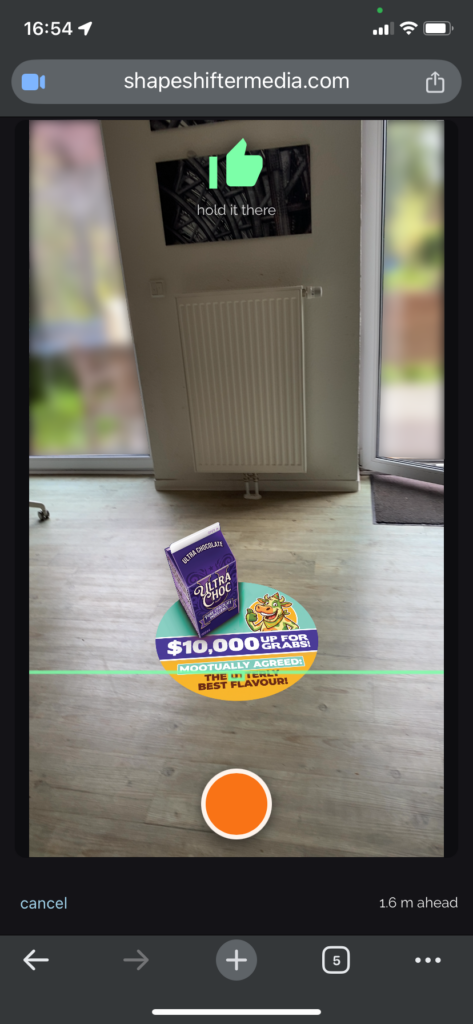
Upright, at chest height, tilted down toward the floor one to two metres ahead of you. There is an indicator on screen — wait until it turns green, then take the shot.
The preview fades out when you hold the device at the wrong angle. That is deliberate, not a fault. The graphic is only a truthful preview at the angle it was built for, and showing it at full strength while you are pointing somewhere else would be claiming an accuracy that is not there. If the design goes faint, tilt back until it comes good.
Live camera mode, and what it will not do
The live view holds the graphic to the floor as you tilt and turn. It does not track you as you walk — the device knows which way it is pointing, not where it is standing, so walking carries the graphic along with you. Frame the shot from where you are, and move before you start, not during.
If the camera will not start
In-app browsers block camera access. If you opened the link from Instagram, LinkedIn, Facebook, TikTok, X or a similar app, the camera will not run. Open the page in Safari or Chrome instead, or just upload a photo you already took — that path works everywhere and produces the same mockup.
Worth knowing before a meeting rather than during one.
The floor and the photo
- Any smooth, clean, dry floor: tile, wood, concrete.
- Uploads are capped at 12 MB and 40 megapixels — any normal phone or tablet photo is fine.
- You get one file back: a JPEG at 1080 × 1350, portrait.
What happens after the mockup
Custom designs
The collection exists to show what the format does. Most real campaigns need something of their own — the client’s product, their character, their promotion, their season. Those are designed to order, for Halloween and for whatever comes after it.
If you have got as far as a mockup that somebody liked, this is the conversation worth having next. Talk to us about a custom design.
Printing
Two routes, and they are genuinely both fine:
- Print it yourself, or with your own supplier. The files work at any wide-format printer. If you already have a print partner, use them.
- Order prints from us, delivered throughout Europe.
If you are printing locally you set your own lead time. If you are ordering prints from us for a dated campaign, ask early — production and shipping need real time, and seasonal cut-offs are published in the tool itself.
Questions people actually ask
Is it free? Yes. No login, no account, nothing to install. You give an email address so the mockup can be sent to you.
Do I need an account? No. The email address at the end is how the mockup reaches you, not a registration.
What happens to my photo? It is deleted as soon as the mockup is built, and it is never publicly accessible at any point. The delivered image has its EXIF and GPS data stripped.
Can I use the mockups in a proposal or a pitch? Yes. That is what they are for.
How long does the link last? The link in the email works for 30 days. Download the image if you need it after that.
Can I get my own designs in the tool? Yes — that is the private client link. Ask us and we will set one up, with a separate link for each of your own clients or projects if you need them.
Can the mockups carry my logo instead of yours? Yes, on request.
Can I print the files myself? Yes. They work at any wide-format printer, on standard substrates. Or order prints from us, delivered throughout Europe.
Can I resize the design to fit my space? No — and this one matters. A 3D FloorGraphic is calculated for a specific final print size and must never be scaled. If you need a different size, the design is recalculated at that size, which is quick and costs less than the original.
What floors does it work on? Any smooth, clean, dry floor — tile, wood, concrete. There are separate materials for indoor and outdoor use.
Will it damage the floor, or make it slippery? The self-adhesive options install easily and remove without residue, and they are covered with an anti-skid laminate. The carpet and heavy-vinyl versions are laid rather than stuck down, and can be moved and reused.
One more thing
No login, nothing to install, and it costs nothing. Go and put something on the floor you are standing on.
If it does not convince you, reply and tell us where it fell short. That is more useful to us than a click.
— —